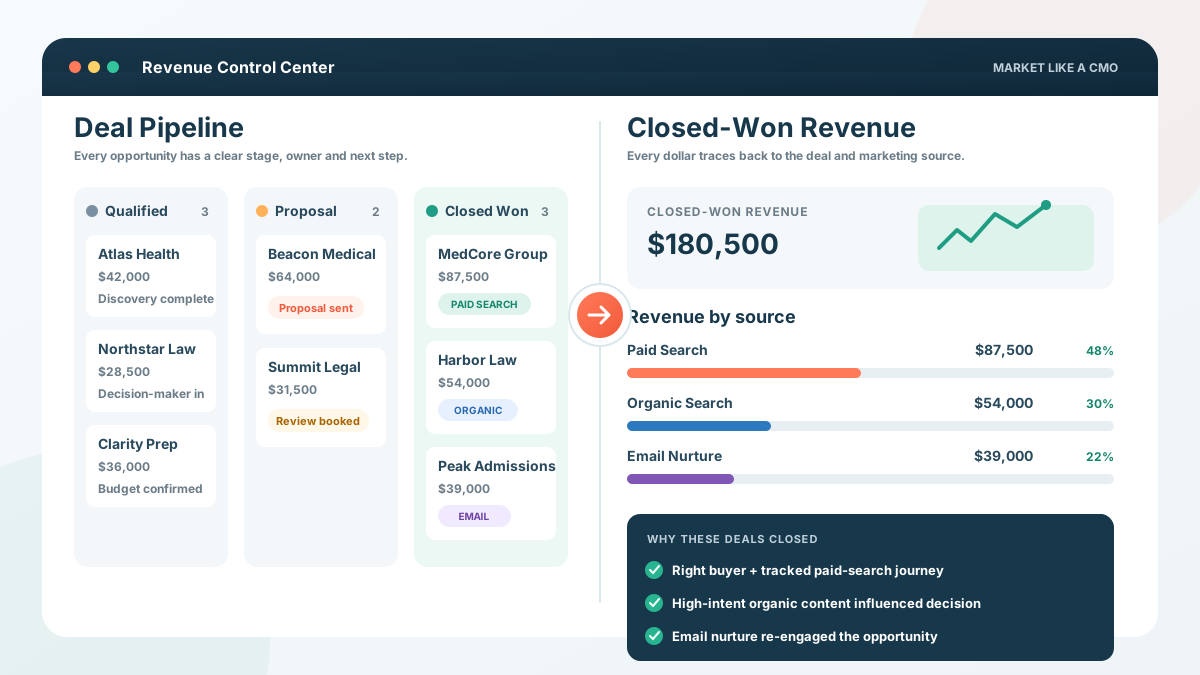
Most HubSpot setups look like they are working. Dashboards load. Deals move. Reports run. But if you cannot take a closed-won deal and trace it back to the marketing interactions that helped create it, your HubSpot is tracking activity better than it is tracking revenue.
That matters because HubSpot revenue attribution depends on the right deal data, contact associations, and trackable interactions being in the CRM. If those pieces are missing, the dashboard can still look polished while the revenue story underneath it is incomplete. See HubSpot revenue attribution reporting.
Before you trust the numbers, run this five-point HubSpot revenue tracking check:
- Trace one deal. Pick a recent closed-won deal and follow the buyer's journey backward.
- Check associations. Make sure the right contacts are attached to every won deal.
- Verify revenue. Confirm deal amounts and closed-won data match the system where money is actually recorded.
- Audit sources. Check whether paid, organic, referral, email, and AI referral sources are being captured correctly.
- Test reporting. See whether leadership can connect channels and campaigns to actual closed revenue without guessing.
If one or more of those breaks down, adding another dashboard will not solve the problem. You need to fix the data feeding it.
How to Tell If HubSpot Is Tracking Revenue Correctly
The clearest sign of broken HubSpot revenue tracking is not a missing report. It is hesitation when someone asks, "Which marketing actually created this revenue?"
You should be able to take a meaningful deal and reconstruct enough of the buyer journey to understand where the opportunity came from, what happened before the sale, and what eventually closed.
Can You Trace One Closed-Won Deal From Start to Finish?
Do not begin by staring at a company-wide dashboard. Start with one deal.
Choose a meaningful closed-won deal from the last 90 days and check:
- Buyer identified. Is the actual buyer or decision-maker associated with the deal?
- Original source known. Can you see how that contact first entered your tracked ecosystem?
- Marketing history visible. Are important forms, page views, ad clicks, emails, or other interactions attached?
- Deal date correct. Does the create date match when the opportunity actually entered the pipeline?
- Revenue accurate. Does the closed amount match what the business actually won?
- Close date correct. Does HubSpot show when that revenue was really closed?
If you have to open a spreadsheet, ask sales what happened, check another platform, and then make an educated guess about the answer, your attribution system has a gap.
The best company-wide attribution report cannot be more trustworthy than the deal records underneath it.
Does Closed-Won Revenue Actually Live in HubSpot?
HubSpot cannot attribute revenue it cannot see. That becomes a problem when the CRM holds contacts and marketing history while another platform holds the financial outcome. A medical practice may record revenue in its practice-management system. A law firm may rely on case-management software. An admissions business may use a separate enrollment platform.
Run this quick check:
- Source of truth. Which platform decides whether revenue was actually won?
- Revenue value. Does the final amount make its way back into HubSpot?
- Customer status. Does HubSpot know when a prospect actually becomes a customer?
- Sync timing. Is that information updated automatically or only when someone remembers?
- Mismatch rate. If you compare ten closed deals across systems, do the amounts and statuses agree?
The goal is not to force every financial system into HubSpot. The goal is to make sure HubSpot receives enough accurate revenue information to support the reports you are using to make marketing decisions.
Does Every Closed Deal Have the Right Contact Attached?
A closed-won deal needs more than an amount. HubSpot's revenue attribution relies on the interactions associated with contacts connected to the deal. If the buyer is missing, associated incorrectly, or has no meaningful marketing history, HubSpot has less information to use when assigning revenue credit.
Check five recent closed-won deals for:
- Contact association. Is the actual buyer attached?
- Deal amount. Is the revenue value complete and accurate?
- Create date. Is the deal creation date populated correctly?
- Close date. Does it reflect when the sale was actually won?
- Marketing activity. Can you see interactions that happened before the opportunity closed?
HubSpot's documentation specifically identifies deal amount, create date, close date, and associated contacts as important inputs for revenue attribution. See HubSpot revenue attribution reporting.
If the deal record is incomplete, attribution built from that record will be incomplete too.
Do Your Deal Stages Reflect Real Buyer Decisions?
Pipeline stages should describe what happened in the buying process, not how optimistic a salesperson feels. A strong stage has a clear entrance rule, and everyone on the team should know exactly what must happen before a deal moves forward.
Ask these questions about each stage:
- Clear event. Did something specific happen before the deal entered this stage?
- Shared definition. Would two salespeople classify the same deal the same way?
- Buyer action. Does the stage reflect progress by the buyer, not just activity by your team?
- Exit rule. Is there a defined event that moves the deal to the next stage?
- Forecast value. Does a deal in this stage have a reasonably consistent chance of closing?
For example, "Proposal Sent" is clear if it means the prospect actually received a formal agreement. "Hot Lead" is not clear if every salesperson defines "hot" differently.
Bad stages create bad conversion rates. They also make forecasting look more precise than it really is.
Are Your Traffic Sources Telling the Truth?
HubSpot can classify traffic into sources such as organic search, paid search, email, referrals, direct traffic, and AI Referrals. Its traffic-source properties can also provide drill-down information for AI platforms such as ChatGPT and Claude when referral data is available. See HubSpot traffic source properties.
That is useful, but you still need to check whether the underlying tracking is clean.
- Consistent UTMs. Paid campaigns should use one naming convention across channels and teams.
- Tracking code coverage. Important landing pages and external conversion pages need to be trackable.
- Integration integrity. Contacts created through outside tools should preserve the source data you need.
- Direct traffic spikes. Large amounts of Direct Traffic deserve investigation.
- AI referrals. Check whether AI platforms are appearing in your source and drill-down data.
- Source changes. Compare Original Traffic Source with Latest Traffic Source instead of relying on one field for every question.
Direct Traffic is not automatically broken tracking. Some visits truly cannot be tied to another referrer. Privacy choices, untracked interactions, copied links, bookmarks, and other behavior can all contribute.
The warning sign is not that Direct exists. It is that Direct becomes the answer for so much of your pipeline that nobody can explain where buyers are really coming from.
Can You Connect Marketing Sources to Closed Revenue?
Now test the question leadership actually cares about: can you show closed-won revenue by marketing source or interaction and trust the output?
Your revenue report should help answer questions such as:
- Paid search. How much closed revenue is associated with paid-search journeys?
- Organic search. Which organic interactions contribute to customers, not just traffic?
- Email. Is nurture helping influence or close meaningful opportunities?
- Campaigns. Which marketing campaigns are tied to won deals?
- AI referrals. Are identifiable AI visits appearing anywhere in your customer journeys?
- Unknown sources. How much won revenue still sits in Direct, Other, or incomplete records?
HubSpot offers several attribution approaches because different models answer different questions. First Interaction helps you understand discovery. Last Interaction emphasizes the interaction closest to conversion. Linear spreads credit across the journey, while other available models can weight interactions differently.
Do not ask one attribution model to tell you the entire truth. Ask the model a specific business question.
What Breaks HubSpot Revenue Attribution and How to Fix It
Most bad HubSpot attribution does not start with a bad dashboard. It starts with disconnected systems, inconsistent tracking, unclear lifecycle rules, incomplete records, or reports built before the underlying CRM architecture was cleaned up.
A strong Revenue Architecture connects the activity marketing sees with the outcomes sales and leadership care about.
Disconnected Systems Separate Marketing From the Money
This is one of the most common problems we see. Marketing activity lives in HubSpot. Revenue lives somewhere else. The business expects reporting to connect them even though the systems do not.
What it looks like:
- CRM has leads. HubSpot knows who filled out forms and booked calls.
- Other platform has revenue. Another system knows what the customer actually paid.
- No clean sync. Revenue or customer status arrives late, inconsistently, or not at all.
- Marketing guesses. The team optimizes around leads because that is the deepest reliable metric it has.
What it costs: You can end up scaling channels that produce activity while starving channels that produce customers.
What fixes it: Decide which system owns each important data point, then build a clean path for customer status and revenue values to flow back into the CRM.
Inconsistent UTMs Fragment Your Marketing Sources
Tracking problems often begin with small naming mistakes. One campaign uses "google." Another uses "Google." A third uses "google-paid." Someone launches a Meta campaign without a campaign parameter at all. Soon, reporting becomes a naming convention archaeology project.
Audit:
- Source. Use one agreed naming convention for each platform.
- Medium. Keep paid, organic, email, referral, and other categories consistent.
- Campaign. Establish a predictable naming structure.
- Content. Use this field consistently when differentiating creative or placements.
- Ownership. Decide who is responsible for keeping the system clean.
The fix is boring. That is why it works.
Consistent tracking lets HubSpot group activity into something leadership can actually compare.
Lifecycle Stages Do Not Match Buyer Behavior
Lifecycle stages are supposed to help you understand progression through the funnel. They become useless when nobody agrees on what they mean.
Look for these warning signs:
- Different definitions. Marketing and sales define MQL or SQL differently.
- Stages move backward. Records are changed manually without clear rules.
- Everything is a lead. Contacts pile up in one stage for months or years.
- Customer is unreliable. Becoming a customer does not automatically update the record.
- No conversion reporting. Nobody can say what percentage moves from one meaningful stage to the next.
A better lifecycle structure gives each stage:
- One definition. Everyone uses the same meaning.
- One trigger. A clear behavior or business event moves the record.
- One owner. Someone is responsible for maintaining the rule.
- One purpose. The stage should help answer a real funnel or revenue question.
If three people define "qualified lead" three different ways, HubSpot cannot fix the disagreement for you.
Your Attribution Model Does Not Match the Question
Attribution models are not competing versions of reality. They are lenses.
Use the one that matches the question you are asking:
- First Interaction. Best for asking, "How are future customers first finding us?"
- Last Interaction. Best for asking, "What happens closest to conversion?"
- Linear. Best for asking, "What does the entire tracked journey look like when credit is shared?"
- Other weighted models. Useful when you want to give more importance to specific positions or patterns in the journey.
The problem begins when leadership looks at one model and concludes, "This channel created 42% of our revenue."
The safer question is: "Under this model, this channel receives 42% of the attribution credit. What does that tell us when we compare it with another model and the actual deal history?"
AI Referrals Add a New Layer to Revenue Attribution
AI traffic is no longer completely invisible inside HubSpot. HubSpot now includes AI Referrals as a traffic-source category and can identify certain AI domains when referral data is passed. But that only captures journeys where a measurable referral reaches the site.
AI can influence a purchase without creating a tracked AI click. A buyer might:
- Ask ChatGPT. They research firms or solutions in an AI conversation.
- See your company. Your brand appears in the response.
- Research elsewhere. They Google your name, visit LinkedIn, or ask a colleague.
- Visit directly. They later type your URL or arrive through another channel.
- Convert. HubSpot records the visit it can see, not necessarily the AI influence that started the research.
That is why CRM attribution and AI visibility measurement need to complement each other.
Gartner reported in 2026 that 45% of surveyed B2B buyers used generative AI during a recent purchase process, largely to gather information about vendors and products. See Gartner's B2B buyer research.
Our AI Visibility + AEO work measures whether brands appear for the questions buyers ask AI platforms and pairs that visibility data with the revenue information the CRM can capture.
What Clean Revenue Tracking Lets You Do
Better attribution does not magically create revenue. It lets you make better decisions about the marketing that does.
When revenue tracking works, you can:
- Scale winners. Increase spend where closed revenue supports the decision.
- Cut waste. Stop funding channels that look good at the lead level but fail at the customer level.
- Improve feedback. Send sales outcomes back into paid-media decisions.
- Defend budgets. Show leadership why a channel deserves more or less money.
- Spot funnel leaks. See where strong leads stop moving toward revenue.
- Trust reports. Spend less time debating whose spreadsheet is right.
For MedSchoolCoach, paid search returned 3.73x ROAS when we took over. In 2025, it returned 8.45x on $12,889,452 in closed revenue while ad spend was lower.
The point was not simply that ads improved. The data became useful enough to show which campaigns were producing business outcomes and where money should move next.
For Peck Law Firm, tracked organic inquiries increased more than tenfold after the content and measurement system changed. Different channel. Different strategy. Same principle: you make better marketing decisions when your CRM can show you what became revenue.
Run This 10-Minute HubSpot Revenue Tracking Test
Before rebuilding anything, test the system you already have. Choose one closed-won deal from the last 90 days and follow these steps:
- Open the deal. Confirm the amount, create date, close date, and stage are accurate.
- Check contacts. Make sure the buyer and other important contacts are associated.
- Review history. Look backward through tracked marketing and sales interactions.
- Find the source. Check Original Traffic Source, drill-down data, and relevant campaign information.
- Compare systems. Confirm the revenue matches your financial or operational source of truth.
- Explain the journey. Try to describe how this buyer moved from discovery to closed revenue without guessing.
If you can do that consistently across deals, you have a strong foundation. If you cannot, fix the architecture before asking the dashboard to give you more answers.
Market Like a CMO's free 45-minute strategy call is built for founders at $5M+ who want to know where their revenue system breaks down before they spend more money trying to scale.
You leave with two or three specific fixes whether or not we work together.
A clearer answer to whether your HubSpot is actually telling you where the money came from.
Frequently Asked Questions About HubSpot Revenue Tracking
Start with one recent closed-won deal and trace it backward. Check the associated contacts, deal amount, create date, close date, original source, and marketing history. If several of those inputs are missing or unreliable, the attribution report may be incomplete even when the dashboard itself loads correctly.
Direct Traffic means HubSpot could not identify another referring source for that visit. Some Direct Traffic is legitimate. It can also appear when referral information is unavailable, tracking is limited, or a buyer reaches the website after an offline or untracked interaction.
If Direct is unusually high, audit:
- UTM coverage. Confirm paid and campaign URLs are tagged consistently.
- Tracking code. Make sure important landing pages are being tracked.
- Integrations. Check whether outside tools preserve source information.
- Buyer behavior. Remember that copied links, bookmarks, privacy settings, and offline discovery can all reduce referral data.
Yes. HubSpot now has an AI Referrals traffic-source category and can identify certain AI referral domains when that referral information is available.
What it cannot automatically capture is every AI-influenced journey. If a buyer sees your company in ChatGPT and later reaches your website through Google or Direct Traffic, HubSpot may see the later source without knowing that AI influenced the earlier research.
Yes, but the activity and resulting deal data need to reach the CRM. HubSpot can use logged calls as interactions in attribution reporting. Offline outcomes also need to be reflected in the associated contact and deal records so the CRM knows what closed and how much revenue was involved.
Test one closed-won deal before auditing the entire portal. If you cannot see the buyer, source, important interactions, correct deal amount, and close information in one place, you have already found a reason to investigate the architecture. Repeat the test with four more deals to see whether the issue is isolated or systemic.